





I started this project after getting inspired by the evolving capabilities of AI. As a designer, I’ve always had ideas for products I wanted to build. In the past, many of these ideas felt out of reach due to the steep learning curve, the time required to learn new tools, and the complexity of actually building something functional. But with AI, that barrier felt lower. I wanted to explore what it meant to be an AI-ready product designer and see how far I could go hands-on.
That’s where TripLuvora was born.
TripLuvora started from a personal pain point. Every time I plan a trip, I spend hours researching where to stay. It’s not just about finding a place with good reviews. I want the area to match my vibe — whether I’m traveling to unwind, explore local culture, or dive into the nightlife. This kind of research takes time and effort, often across many tabs, apps, and maps.
Digging deeper, I used Perplexity to explore just how common this problem is. I found that travelers spend an average of 303 minutes — over five hours — engaging with travel content in the 45 days before booking a trip. That’s a huge time investment, especially for something that’s supposed to be fun and exciting.
The frustration doesn’t stop there. The digital age has opened up endless travel choices, but that abundance has led to choice paralysis and information overwhelm. Travelers often feel stuck trying to compare too many options — different booking platforms, conflicting reviews, hidden fees, and so on. In the US, 90% of participants in one study said that planning a trip takes a lot of time and effort, compared to 60% in Europe.
Even worse, the tools we use to plan are often fragmented. People are switching between tabs for maps, blogs, booking sites, and social media just to get a full picture. There’s no central place to understand neighborhoods or areas that align with someone’s travel preferences. That’s the gap I wanted TripLuvora to fill.
This project isn’t just an experiment in AI. It’s a response to a real, frustrating experience that many people face. I’m using AI tools to build a better way forward — one that’s faster, smarter, and more intuitive for travelers. I want to start by saving travelers at least five hours of their time from researching which area fits them best, and ultimately work toward building AI-driven personalization and integrated travel ecosystem.
This is how my current workflow looks. It has changed a lot as I learned, experimented, and figured out what suits me best. Fun fact: just two months ago, out of all the tools I use in the current workflow, I was only using Figma and ChatGPT. Since then, my process has grown significantly.
The workflow is organized into three main parts: Research, Design, and Development, all supported by AI copilots and centralized documentation in Notion.
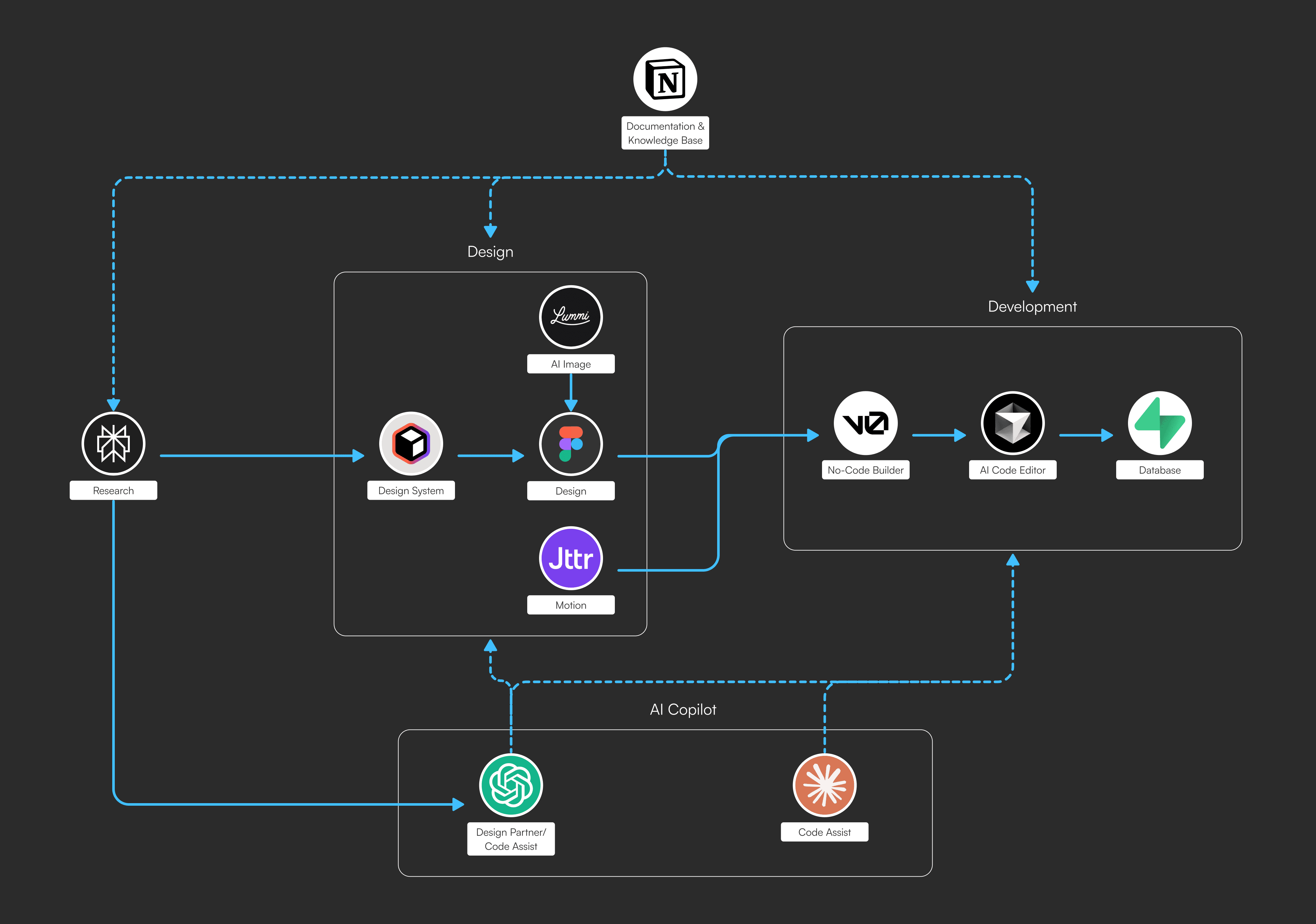
Everything begins with research. I dive deep into understanding the users, the pain points, and the opportunity space. All insights, references, and notes are documented in Notion, which acts as my single source of truth and reference across the project.
From there, I built a design system using Relume, which helped speed up the process instead of starting from scratch. Once the foundation was set, I moved into the site map, wireframes, and then high-fidelity designs in Figma. I used Lummi to generate visual assets that matched the vibe of the project, and Jitter to create Lottie animations for added motion on the web app. These designs were then sent directly into V0, a no-code builder that lets me quickly turn design files into functional interfaces.
Development is a mix of no-code and code. I use V0 to build the core pages, and when I need more control or customization, I turn to ChatGPT or Claude to help shape the vision I have in mind. Once the base UI is ready, I switch to Cursor, an AI-enhanced code editor, to refine functionality and implement advanced features.
I initially used Notion as a backend for faster MVP setup, but performance limitations especially around latency led me to switch to Supabase, which now reliably handles my data needs.
AI plays a critical role in my workflow. I use ChatGPT and Claude as thought partners to help brainstorm, debug, and build logic. Inside Cursor, AI assistance helps me work through issues and experiment more confidently with new approaches.
The diagram reflects how my process works as a system. Each tool has a specific role, but the real value comes from how they connect together. This setup allows me to stay fast, flexible, and focused on shipping.
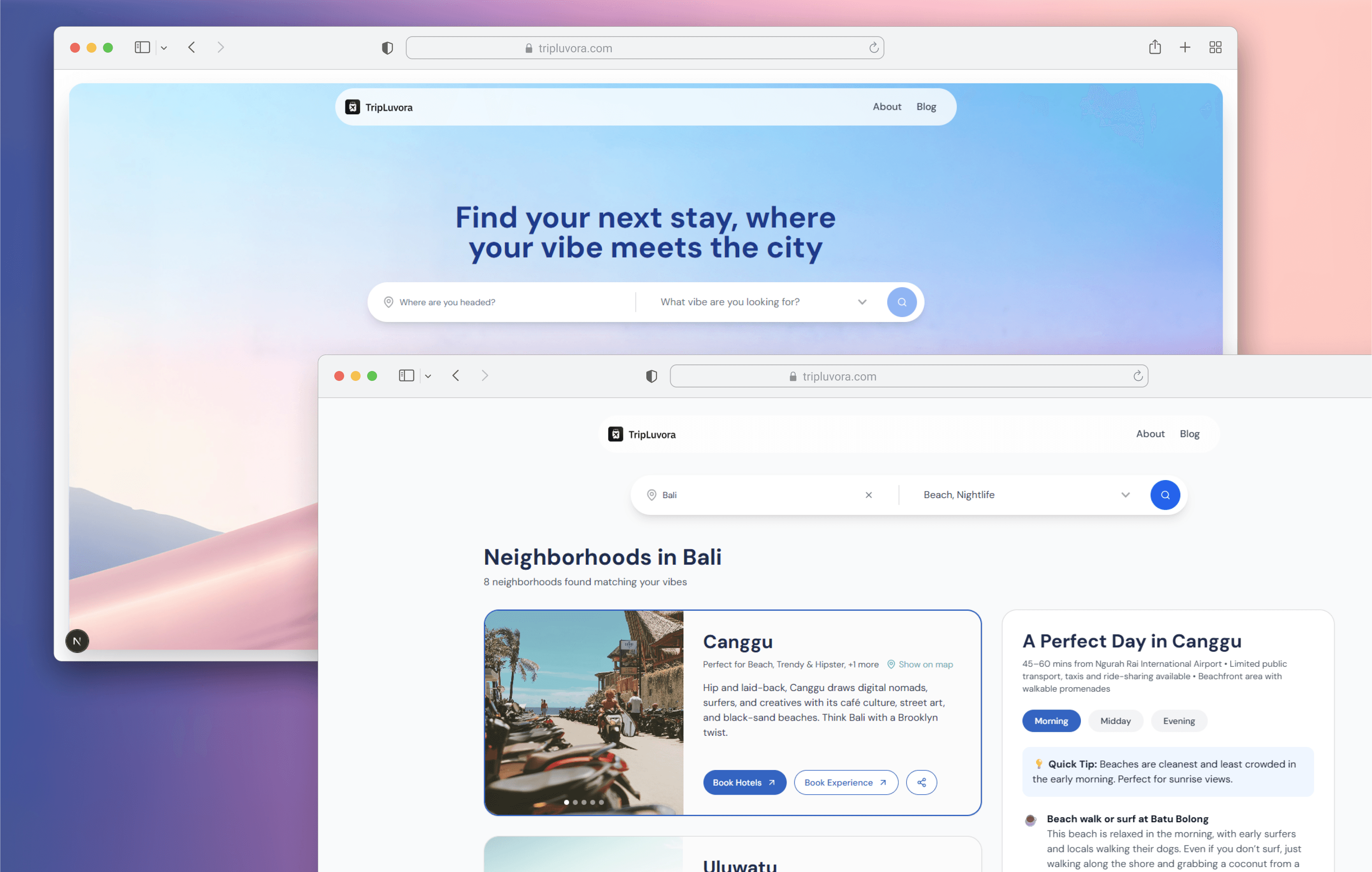
As of 2 June 2025, I’ve spent over 80 hours building TripLuvora, and it’s been a wild journey. I’ve successfully built the front-end for the landing page, implemented a functioning search bar connected to the backend, completed a results page that returns neighborhoods based on city and vibe selections, designed a curated day itinerary to help users feel what it's like to stay in each neighborhood, and developed an admin CMS for smoother content management.
One of the biggest blockers I encountered was having to restart and rebuild everything due to persistent lagging issues with V0. After hitting the same issue a second time, I decided to switch to Cursor—and that changed everything. I quickly realized that V0 wasn’t suited for building a detailed, complex product. Cursor gave me the control and stability I needed to keep pushing forward.
Honestly, it still feels surreal to see how much I’ve accomplished in just 80 hours.
Discovery & Definition
Laying the foundation with a clear vision, research, and tool exploration
TripLuvora began with a simple mission: help travelers find neighborhoods that match their vibe. I wanted it to feel like a friend giving personalized advice rather than a generic hotel search. I defined the MVP to include city and vibe selection, curated neighborhood cards, and an admin CMS. I also outlined future features such as AI suggestions, an interactive map, social elements, and monetization options.
To find the right workflow, I explored a range of no-code tools. After testing several options, I chose V0 for its strong Figma integration, which made UI adjustments more manageable. This gave me a clear direction to begin the project with focus and intention.
Foundation Building
Setting up the design system, backend architecture, and development workflow
With my tools selected, I started laying down the core. I used Relume to create a design system that helped speed up my UI work. In Figma, I built a full sitemap, wireframes, and high-fidelity designs. Lummi supported the visual direction by generating assets that matched the overall aesthetic.
I initially chose Notion as a lightweight backend to move quickly, but latency issues made it unfeasible even after caching. I pivoted to Supabase, which required more time and debugging to get working. Once integrated, I populated the database with SQL scripts and enabled row-level security for admin access.
The current version of TripLuvora runs on a flexible front-end and back-end setup, allowing for rapid iteration and scalability:
Framework: Next.js (React, App Router)
Language: TypeScript
Styling: Tailwind CSS, custom themes
Animations: Framer Motion, Lottie via Jitter
Backend & Auth: Supabase
This stack evolved as I learned which tools aligned with my goals and where I needed more control and performance. Moving from no-code to custom code with AI support has dramatically increased the efficiency and flexibility of the build.
Feature Development & Content System
Bringing the product to life and enabling scalable content management
My original plan was to set up the backend before the frontend since I was less experienced in backend development. Although the process was rough, it helped me understand how the system needed to work. I connected APIs from Pexels and Unsplash for dynamic image sourcing.
I then built a CMS dashboard in V0 to manage cities, neighborhoods, and vibe tags. Key UI components like neighborhood cards were refined, and supporting pages such as the About, FAQ, and Blog were added.
At this point, the product was technically functional but visually uninspiring. I hit a creative block trying to match my vision using prompts. I paused to regroup and worked on my portfolio, then returned with a clearer roadmap. I redesigned the landing page from scratch with a focus on clarity and user experience.
Navigating Blockers
Hitting limits, pivoting tools, and building smarter with AI
Coming back with fresh focus, I restructured the sitemap for better scalability and redesigned the core pages in Figma. This time, I built the frontend first and then reconnected the backend. This approach gave me more control and a better understanding of how everything fit together. After generating the base UI in V0, I fine-tuned it through direct code editing using ChatGPT and Claude. This allowed me to customize sections precisely rather than relying on prompts that sometimes introduced things I did not ask for.
Eventually, I ran into a major blocker. V0 began lagging badly, and after being forced to rebuild everything twice, I realized it was not the right tool for a complex product. I made the switch to Cursor, which offered a more stable and hands-on development environment.
Setting up Cursor properly was a key moment. I created internal documents for the tech stack, API endpoints, and architecture. This made it easier for Cursor’s AI features to help with coding. Since my Supabase backend was already established, I could reuse the same structure without much friction.
UX Deepening & Iteration
Turning basic functionality into a richer and more immersive experience
Once the foundation was in place, I focused on improving the experience. The early version of the results page felt flat and uninspired, so I redesigned it to help users imagine what it would actually be like to stay in each neighborhood.
I introduced:
A day-in-the-life preview with morning, afternoon, and evening activities
Travel insights such as distance from the airport, walkability, and transport options
TikTok embeds to provide real-world visuals and vibes
A new itinerary table in Supabase to support dynamic planning
Replacement of all mock data with real, structured content
This stage brought the project to life and made the product feel like something real and usable.
What’s Next
Final content, mobile responsiveness, and preparing for beta
The next step is to complete content for all neighborhoods and day itineraries. I will also review edge cases, optimize UX, and make the platform fully responsive for mobile. Once that is complete, I will begin preparing for a closed beta launch to gather feedback and refine the experience further.
Too often, we only see the polished outcomes. But building in public, especially in emerging spaces like AI, is how we learn faster and help others do the same.
If you’re a designer curious about AI, my biggest advice is this: don’t wait to “get it right.” Just start, learn out loud, and adapt as you go.